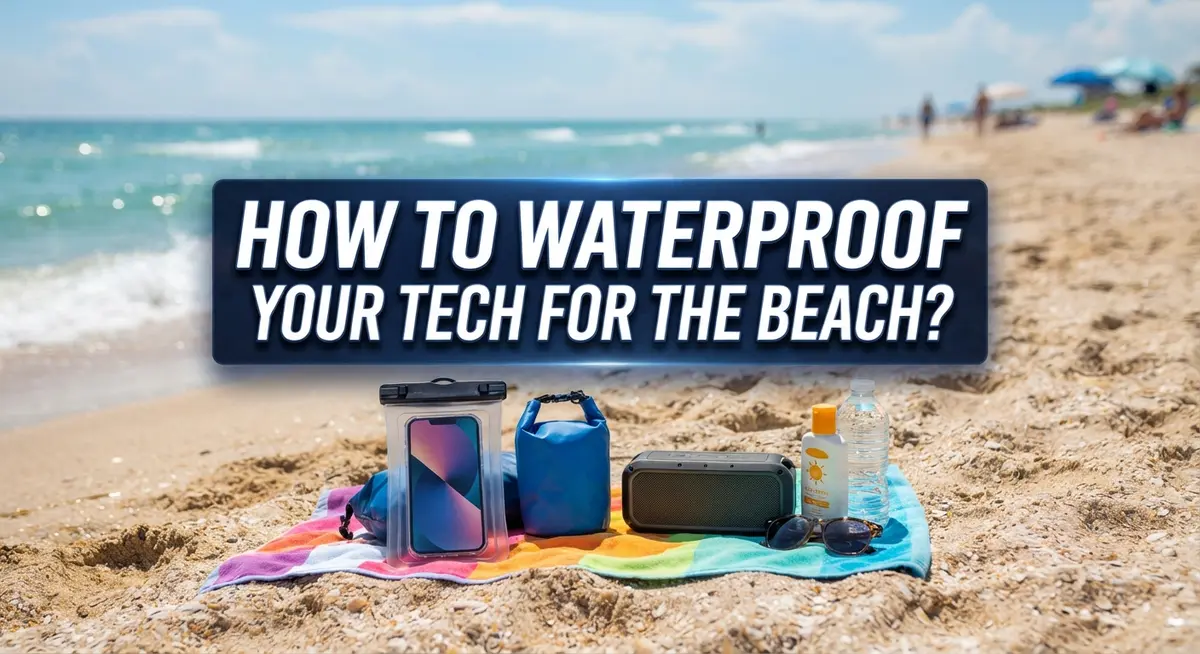
How to Waterproof Your Tech for the Beach?
A day at the beach sounds perfect. Sun, waves, and sand between your toes.
But your phone, camera, or speaker does not share your excitement. Saltwater, sand, and extreme heat can wreck your tech fast.
Many people learn this lesson the hard way. A splash from a wave or a sudden drop in the sand can end a device’s life in seconds.
The good news? You can protect your gadgets with a little planning. Waterproofing your tech does not require expensive gear or complicated steps.
This guide covers everything you need to know. We will explain IP ratings and what they actually mean for your devices.
You will learn simple tricks like using silica gel packs and ziplock bags. We will also show you how to test your device’s waterproofing before you trust it near water.
Beyond water, we will tackle sun and heat damage too. These hazards often get ignored, but they cause just as much harm.
By the end, you will know exactly how to keep your tech safe. That means more time enjoying the beach and less time worrying about your devices.
In a Nutshell
Here is a quick summary to keep your gadgets safe at the beach.
-
Check the IP rating first. This tells you how much water and dust your device can handle. Never assume your phone is fully waterproof.
-
Test before you trust. Try your device’s water resistance in a sink with a paper towel underneath. This shows leaks before they ruin your beach day.
-
Use ziplock bags for backup protection. Even waterproof phones benefit from an extra layer. Sand and saltwater can still sneak into small openings.
-
Pack silica gel packets. These absorb moisture and prevent water damage inside pouches or bags. They are small but very effective.
-
Protect against heat too. Direct sunlight can hurt your device as much as water. Keep gadgets shaded with a towel, umbrella, or cooler.
-
Handle with dry hands only. Wet fingers can damage ports and buttons over time. This simple habit saves you from costly repairs.
Follow these steps and your tech will survive sand, sun, and surf without any trouble.
Understanding Beach Hazards to Your Devices
Your electronics face serious threats at the beach. Understanding these hazards helps you protect your devices effectively.
Saltwater is the biggest enemy. It corrodes metal parts, damages circuits, and can ruin your device permanently. Even a few drops of saltwater can cause problems inside your phone or camera. Sand particles get into ports and buttons, scratching screens and creating connection issues. When sand mixes with moisture, it becomes abrasive paste that damages internal components.
Heat and direct sunlight cause real damage too. Batteries drain faster in extreme temperatures. Screens can malfunction when exposed to intense UV rays for long periods. Some devices shut down automatically when they get too hot, protecting the battery but interrupting your beach day. Prolonged sun exposure can permanently reduce battery lifespan.
Humidity and moisture create another problem. Salt spray hangs in the air near the ocean. This moisture settles on your device even if you keep it away from water. It can seep into small gaps and cause corrosion over time.
Understanding IP ratings helps you know your device’s limits. These codes tell you the water and dust resistance level. An IP67 rating means better protection than IP54. Check your device’s specifications before bringing it to the beach.
Your device’s ports and speakers are vulnerable spots. Water enters through charging ports, headphone jacks, and speaker openings easily. These areas need extra attention when planning protection strategies.
Sand gets everywhere at the beach. It sticks to wet surfaces and scratches protective cases. Sand inside ports can damage charging connections permanently.
Knowing these hazards lets you make smart choices about protection methods. You can enjoy your beach day while keeping your tech safe from saltwater, sand, heat, and humidity damage.
Decoding IP Ratings and Waterproof Levels
IP ratings use a two digit code system. The first digit shows dust protection. The second digit shows water resistance. You will see ratings like IP67 or IPX8 on your device.
The first number ranges from 0 to 6. A rating of 0 means no dust protection at all. A rating of 6 means complete dust protection. Most beach devices fall somewhere in the middle. IP4 protects against splashes. IP5 handles water jets. IP6 stops dust and water completely.
The second number ranges from 0 to 9. This number matters most for beach use. A rating of 0 means no water protection. A rating of 4 protects against splashes from any direction. A rating of 5 handles low pressure water jets. A rating of 7 means your device survives brief immersion in water. A rating of 8 means it handles continuous immersion.
IPX8 is the highest rating you will find. This means your device works underwater for extended periods. However, even IPX8 devices have depth and time limits. Check your manual for exact specifications.
IPX5 and IPX6 ratings work well for beach days. These protect against splashes and brief water contact. They do not guarantee full submersion safety.
Remember that IP ratings only measure water and dust. They do not protect against sand grinding into ports or extreme heat damage. Saltwater also poses special challenges because it corrodes metal components over time.
Check your device’s rating before heading to the beach. This simple step prevents expensive mistakes. You can find this information in your manual or on the manufacturer’s website. Knowing your device’s limits helps you choose the right protection method for your specific situation.
Step-by-Step: Preparing Your Device Before You Leave
Before you head to the beach, take time to prepare your device properly. This simple step prevents most damage that happens during beach trips.
Start by checking your device’s waterproof rating. Look at the manufacturer’s documentation or visit their website. Find the IP code listed there. This two digit number tells you exactly what your device can handle. An IPX5 or IPX6 rating means your phone handles splashes well. IPX8 rated devices work underwater for longer periods. Knowing this helps you decide what extra protection you need.
Test your device’s waterproofing before leaving home. Fill a sink or tub with fresh water. Place a paper towel underneath your device. Dip it briefly into the water for a few seconds. Check if water got inside. This simple test catches any problems before you reach the beach. Never skip this step, even if your device claims waterproof protection.
Turn off your device completely before packing it away. Power down before storing it in protective bags. This reduces the risk if water somehow gets inside.
Gather your protection supplies the night before. You will need ziplock bags in the right sizes for your devices. Pack several silica gel packets to absorb moisture. These packets work hard to keep humidity out of your bags.
Store your device in a cool, dry place until you leave. Keep it away from windows and direct sunlight. Do not leave it near drinks, sunscreen bottles, or wet towels. Store it somewhere stable so nothing can knock it over.
These preparation steps take just 15 minutes but save your expensive electronics from serious damage.
Testing Your Waterproofing at Home First
Testing your waterproofing at home is the smartest move before taking your device to the beach. This simple step prevents expensive damage and gives you real confidence in your protection method.
Start by filling a sink or bathtub with fresh water. Fresh water is best because it matches testing conditions without salt damage. Place a paper towel inside your protective bag or case first. This towel acts as a moisture detector.
Gently place your device in the water for 30 seconds. Keep it shallow and avoid submerging it completely unless your device has an IPX7 or IPX8 rating. Check the paper towel afterward. If it stays dry, your protection method works well.
Remove your device and inspect all areas carefully. Look at the screen, buttons, ports, and speaker openings. Wipe everything dry immediately with a soft cloth. This prevents moisture from settling into crevices.
Test your device’s functions next. Turn it on and check the screen, speakers, and touchscreen responsiveness. Make sure everything responds normally. Any unusual behavior means your waterproofing needs adjustment.
Repeat this test with each protection method you plan to use. If you’re using multiple bags or cases, test each combination separately. Different bag sizes and sealing techniques produce different results.
Do this test at least 24 hours before your beach trip. This gives you time to find better protection if needed. Never skip this step, even if your device has a high IP rating. Real world conditions at the beach are harsher than home testing.
Your device will thank you for this careful preparation.
Protecting Devices from Sun, Heat, and Sand
The sun, heat, and sand create serious risks for your electronics at the beach. Direct sunlight damages batteries and screens over time. Heat causes internal components to malfunction or shut down completely. Sand acts like tiny grinding stones that scratch surfaces and jam into ports and buttons.
Start by keeping your device in shade as much as possible. Use an umbrella, beach towel, or specialty bag to block sunlight. Never leave your phone or tablet sitting in direct rays, even for short periods.
Store your device away from sand and moisture when you’re not using it. Keep it in a sealable bag or pouch. Place silica gel packets inside the bag to absorb any moisture that enters. These packets work hard to keep humidity levels low around your device.
Heat management matters just as much as waterproofing. Devices overheat quickly in hot beach environments. Store your electronics in a cool spot, not in a hot beach bag or car. Check your device regularly to make sure it’s not getting too warm to touch.
Avoid handling your device with wet or sandy hands. Sand particles stick to moisture and scratch screens easily. Rinse your hands with fresh water and dry them completely before touching your device.
When you’re done for the day, turn off your device completely. This reduces heat buildup and protects internal circuits. Store it in a dry location away from windows overnight.
Sand is harder to remove than water. Once sand gets into charging ports or speaker openings, it causes lasting damage. Prevention is your best defense. Keep sand away from your device entirely by storing it properly and handling it carefully throughout your beach day.
Best Practices for Handling Tech at the Beach
After your beach day ends, your tech needs proper care to stay healthy. Start by powering down your device completely before you do anything else. This simple step prevents water or sand from causing electrical damage while the device is still running.
Next, inspect every surface carefully. Check the screen, charging port, speaker openings, and button areas for sand or saltwater residue. Use a soft, dry cloth to gently wipe the exterior. Never rub hard or use paper towels, as these can scratch your screen.
If sand got inside any openings, resist the urge to blow it out. Compressed air works better, but use it gently from a distance. For stubborn sand in ports, a small soft brush designed for electronics helps without forcing debris deeper.
Let your device air dry completely in a cool, shaded spot. This takes several hours, so patience matters here. Place silica gel packets nearby to absorb any remaining moisture. These packets pull humidity from the air and protect your device while it dries.
Check your device after 24 hours of drying time. Power it on and test all functions. Make sure the screen works, buttons respond, and speakers produce sound. If anything seems off, let it dry longer before investigating further.
Store your device in a dry location away from windows and direct sunlight. Keep it separate from liquids and moisture sources. By following these steps, you remove salt and sand that could corrode internal components over time. Your tech will work reliably for many beach trips to come.
Common Mistakes That Lead to Device Damage
Many people damage their devices at the beach without realizing their mistakes. Understanding these errors helps you protect your tech before problems happen.
The biggest mistake is skipping the water test. You must test your waterproofing in a sink or tub before going to the beach. Many people assume their device is safe without actually checking. A quick 30 second test with fresh water reveals if water enters through ports or seams. This simple step prevents expensive damage.
Using your phone with wet hands is another common error. Moisture on your fingers transfers directly to your device. Water can seep into charging ports and button openings. Always dry your hands completely before touching your tech.
Ignoring heat damage is equally dangerous. Direct sunlight heats your device rapidly at the beach. High temperatures damage batteries and internal components. Keep your device under an umbrella or towel throughout the day.
Storing devices near liquids causes preventable disasters. People place phones next to drinks or sunscreen bottles. Spills happen quickly at the beach. Always store your device away from any moisture sources.
Many people also underestimate sand damage. Sand particles are tiny and sharp. They scratch screens and damage charging ports permanently. Never blow sand out of your device, as this pushes particles deeper inside.
Leaving your device powered on while storing it creates problems too. Heat builds up inside powered devices. Turn off your tech completely before storing it in bags.
Finally, exposing your device to extreme temperature changes causes condensation. Moving from hot sun to a cold cooler creates moisture inside your device. Let your tech adjust to temperature changes slowly.
Avoiding these mistakes keeps your beach tech safe and functional.
What to Do If Your Device Gets Wet Anyway
Even with the best preparation, accidents happen at the beach. Your device might slip into the water or get splashed unexpectedly. Knowing what to do immediately after makes a huge difference in saving your tech.
First, stop using your device right away. Power it off completely within seconds of water exposure. This prevents short circuits that can permanently damage internal components. Don’t wait to see if it still works.
Next, remove any protective case or covering. Trapped water inside cases causes ongoing damage. Gently pat the exterior dry with a soft cloth, but avoid rubbing aggressively.
Leave the battery in place if you can’t remove it easily. Removing batteries incorrectly sometimes causes more harm than the water itself. If your device has removable parts like SIM cards or memory cards, take them out and dry them separately.
Place your device in a dry location immediately. Use silica gel packets or uncooked rice to absorb moisture from the air around it. These materials pull water vapor away from your electronics. Keep the device in a cool, shaded spot, never in direct sunlight or near heat sources.
Wait at least 24 to 48 hours before powering your device back on. This gives internal moisture time to evaporate completely. Turning it on too soon risks permanent damage to circuits and connections.
After the waiting period, inspect your device carefully. Check charging ports, speaker openings, and microphone areas for any remaining water droplets or salt residue. If you spot anything, wait longer before powering on.
Contact the manufacturer if your device doesn’t work after drying. Many devices have warranty coverage for water damage, depending on your model and coverage plan. Document what happened with photos for your records.
Final Thoughts
Keeping your tech safe at the beach does not need to be complicated. A little planning goes a long way. Simple habits protect your phone, speaker, or camera from sand, water, and heat.
Always check your device’s waterproof rating before you head out. This rating tells you exactly how much protection your device already has built in.
Remember to test any waterproofing gear at home first. A quick check in a sink or tub saves you from surprises later at the beach.
Silica gel packets are small but powerful tools. They absorb moisture and help prevent damage before it starts.
Ziplock bags remain one of the easiest and most reliable ways to shield your device. They are cheap, simple, and work well against sand and splashes.
Shade matters just as much as waterproofing. Direct sunlight heats up devices fast, so use a towel, umbrella, or cooler to keep your tech cool.
Bluetooth speakers often come with waterproofing already built in. Still, check the specifications before assuming they can handle heavy splashes or full submersion.
Good habits matter more than expensive gear. Turning off your device, keeping it away from liquids, and storing it properly are steps anyone can follow.
Beach days should be fun, not stressful. With the right precautions, your tech can survive sand, sun, and water without trouble.
Take a few extra minutes before you leave home. Pack your protective gear, test it, and plan where you will store your device during the day.
Small steps now prevent big problems later. Your tech will thank you, and so will your wallet.
Frequently Asked Questions
What does the IP code mean for beach protection?
The IP code tells you how well your device handles water and dust. It uses two numbers. The first number rates dust protection from 0 to 6. The second number rates water resistance from 0 to 9.
A rating of IP67 means your device can survive dust and short water submersion. IP68 offers even better protection for deeper water. Check your device manual to find its exact rating before heading to the beach.
Can I use a regular ziplock bag to protect my phone?
Yes, ziplock bags work well for basic protection. They keep water and sand away from your device. Make sure the bag seals completely and has no holes or tears.
Test it first by placing a paper towel inside and sealing it near water. If the paper stays dry, your bag is ready for the beach. This method costs almost nothing and provides reliable defense.
Should I turn off my device before storing it at the beach?
Absolutely. Power off your device before putting it away. This prevents electrical damage if moisture sneaks past your protection barriers.
A powered off device is much safer than one running in humid conditions. Wait until you get home and your tech is completely dry before turning it back on.
How does silica gel help protect my tech?
Silica gel packets absorb moisture from the air around your device. They keep humidity levels low inside storage bags and cases. This stops condensation from forming on your electronics.
Place a few packets in your beach bag near your device. Replace them if they become saturated with moisture.

Dillip is the founder and editor of CodeAndGen.com, where he simplifies tech for everyday users through in-depth reviews, honest comparisons, and practical buying guides. When he’s not testing the latest gadgets, he’s researching the next big thing in tech to help readers make smarter, more confident purchasing decisions.